Quick buy
Buy any coin from the terminal in one click, with an amount you set once.
Quick buy skips the coin page: you set an amount once, then every coin in the terminal gets a buy button for exactly that much.
doggie.fun/launches
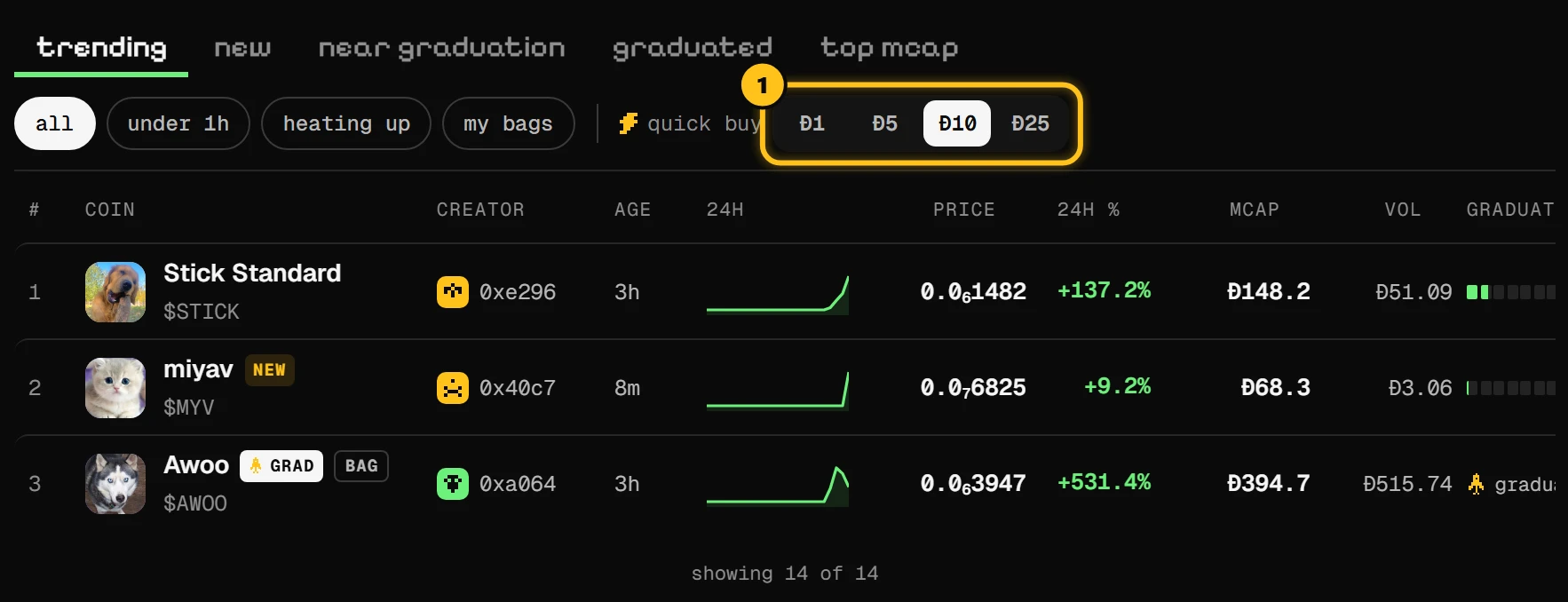
- 1Pick the amount: Ð1, Ð5, Ð10 or Ð25.
Pick an amount
In the terminal, next to quick buy, tap the amount you want to spend per buy.
Tap the buy button on a coin
Each row gets a buy button for that amount. Tap it.
Approve in your wallet
The button shows sign, then sending, then bought. A message tells you how many tokens you got.
Good to know
- Quick buys use the standard 1% slippage.
- They work after graduation too: the buy goes through the coin's pool.
- While a sold-out coin opens its pool, its button is paused (opening).
- The sniper tax still applies to coins launched seconds ago. The coin page shows it; quick buy doesn't. When in doubt, wait a few seconds or use the coin page.
One tap and your wallet's approval is all it takes, so check the coin before you tap. Names and symbols can be copied. Stay safe